About reading Antigravity quota in Nowdex
Google says third-party apps that read Antigravity quota can get accounts suspended. What this means for Nowdex users, how to temporarily disable or disconnect Antigravity in Nowdex, and what to do if your account is affected.
TL;DR
- Google says third-party apps that use an Antigravity sign-in to read quota can get accounts suspended, and that is how Nowdex reads it.
- To avoid the risk, temporarily disable or disconnect Antigravity in Nowdex.
- If Nowdex can’t get Antigravity quota for an account, check that account in the official Antigravity app and appeal if needed.
- Other services are not affected.
Google has tightened how Antigravity accounts may be used. On its official forum, Google stated that third-party apps using an Antigravity sign-in to call its quota endpoints is not permitted under the Antigravity Terms of Service, and accounts may be suspended for it. T3 Code, Magpie and other tools have stopped making these calls.
Nowdex reads Antigravity quota in exactly this way. It only reads quota and never sends prompts, but Google does not treat these uses differently. Keeping Antigravity connected in Nowdex may put your Google account at risk.
How to temporarily disable or disconnect
On iPhone, tap your Antigravity account on the Status tab and scroll to the bottom:
- Temporarily Disable: turn on the Temporarily Disable switch under Actions. It applies to all Antigravity accounts. While disabled, Nowdex and its widgets send no requests to Antigravity, and the last fetched usage stays visible. Turn the switch off to resume.
- Disconnect: tap Disconnect at the bottom. This disconnects the account and removes its saved credentials from this device.
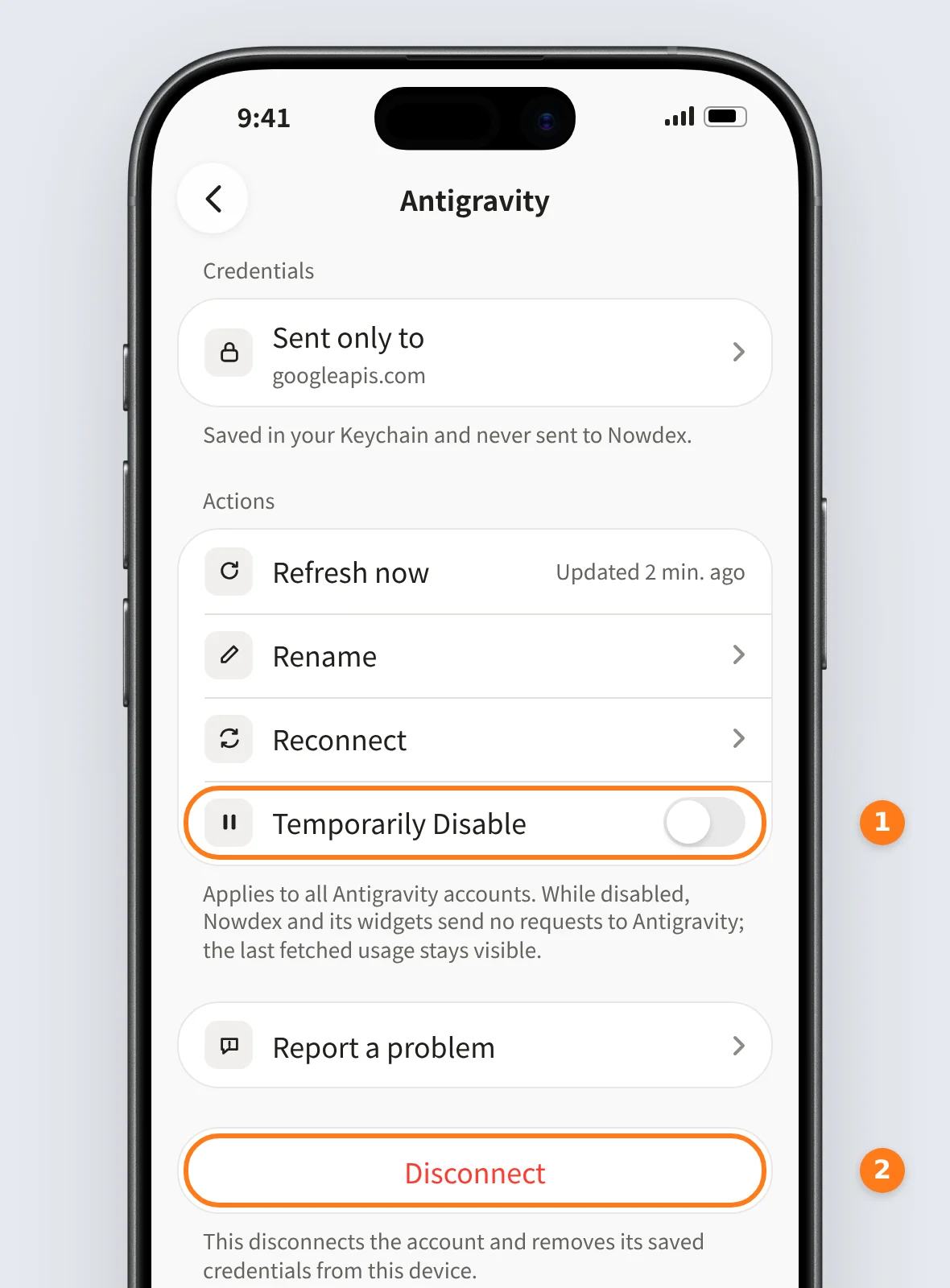
On Mac, the account card’s menu has Temporarily Disable and Disconnect… as well.
If you use Nowdex on more than one device, do this on each of them. You can check your quota in the official Antigravity app’s settings.
If Nowdex can’t get Antigravity quota
Nowdex shows “Couldn’t get Antigravity quota for this Google account.” (1.5.1 and earlier say “Antigravity denied quota access for this Google account.”). It means Google refused the quota request, which on its own doesn’t mean the account is suspended. Open the official Antigravity app to check its status:
- If it says “This service has been disabled in this account for violation of Terms of Service”, Google says the account was disabled for a Terms of Service violation. Submit the appeal it offers. Each account gets one appeal.
- Before you appeal, disconnect this Antigravity account in Nowdex, on every device where you use Nowdex, so Nowdex doesn’t request quota with it once the appeal succeeds.
What Nowdex will do
In upcoming versions:
- Connected Antigravity accounts keep working and show a risk notice.
- New Antigravity connections are paused.
- If Google refuses an account for a Terms of Service violation, Nowdex stops refreshing it until you refresh by hand.
Other services are not affected. If you have questions, send feedback from the app.
References
- Google AI Developers Forum, Google staff reply (2026-11-23): Reading a user’s Antigravity OAuth credentials to call quota endpoints is not permitted and can result in suspension
- Google AI Developers Forum, Google staff reply (2026-11-23): There is no public quota API for personal Antigravity accounts
- T3 Code (2026-11-25): PR #43026, stop reading Antigravity usage limits from Google’s internal APIs
- Magpie (2026-11-15): Retired the Antigravity plugin that called Google directly
- Magpie (2026-11-26): Quota is read only through the official agy CLI
- OpenUsage (2026-11-26): Issue #1739, reviewing Antigravity quota polling via Google’s internal API