
How to check your AIHubMix balance in Nowdex
What AIHubMix is, and how to put your AIHubMix balance, spend, and request count on your iPhone widgets and Mac menu bar with a Manage Key.
AIHubMix is an API gateway for large language models. You sign up, add credit once, and then use the same sk- API key with an OpenAI-compatible interface to call Claude, Gemini, DeepSeek, and models from many other providers. It bills each call against your account balance. You don’t need to open a separate account and add a card with every provider, and switching models only means changing the model name.
The catch with pay-as-you-go is that the balance drops quietly. You’re halfway through a task when calls start failing, and only then do you find out the account is empty.
The short answer: log in to the AIHubMix console to see your balance. If you’d rather not open a web page every time, use Nowdex to put the balance on your iPhone Home Screen or Mac menu bar.
What Nowdex shows
| Name | What it means |
|---|---|
| Balance | How much money is left in the account, in US dollars. |
| Used | The total amount this account has spent. |
| Requests | The total number of calls made. |
| Low-balance email | Only appears if you turn on balance reminders in AIHubMix. It shows the reminder threshold. |
AIHubMix is prepaid. There is no weekly or 5-hour quota that resets, so what you see here is your wallet balance, not a reset time.
1. Get a Manage Key from AIHubMix
Nowdex needs a Manage Key, not the sk- API key you use to call models. The AIHubMix console calls the same credential the Management Key. An sk- key can call models but can’t read your account balance, and Nowdex will ask you to use a different key.
- Log in to the AIHubMix console in your browser.
- In the left sidebar, find the DEVELOPER group and click Developer.
- The Management Key card at the top of the page shows your key. Click Copy.
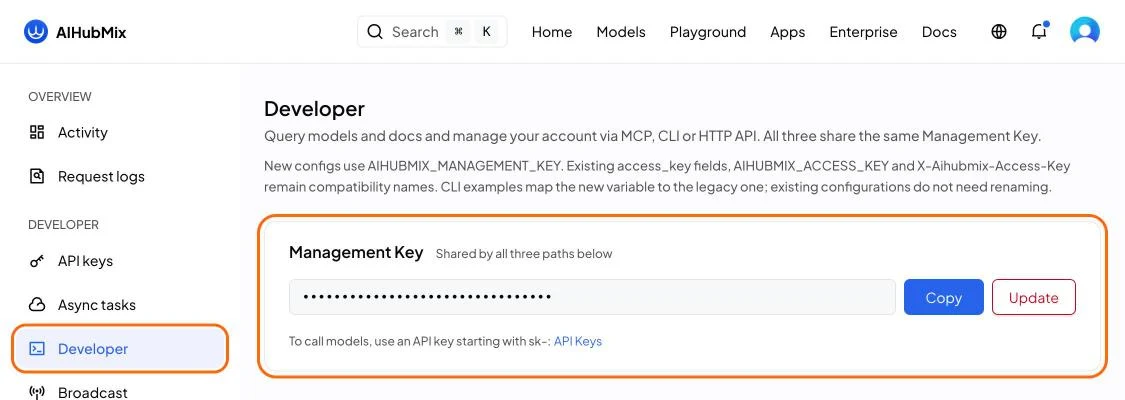
A few things to keep in mind:
- Don’t click Update unless you want a new key. The old key stops working, so any CLI, MCP setup, or Nowdex connection using it has to be updated with the new one.
- A Management Key can do more than read your balance. It can also create and delete API keys, so keep it as carefully as a password and don’t paste it into chats or screenshots. Nowdex uses it only to read your account balance.
- The line under the card, “To call models, use an API key starting with
sk-: API Keys”, leads to your list ofsk-keys. Those are for calling models, not for this.
2. Connect AIHubMix in Nowdex
- Open Nowdex, add an account, and choose AIHubMix under the Gateways group.
- Paste the Management Key you copied into the Manage Key field.
- Click Connect. Nowdex reads your balance once with this key to confirm it works, then adds the account.
Once connected, AIHubMix appears on the Status tab, alongside Claude, Codex, Cursor, and your other accounts. From there you can:
- Add a Nowdex widget to your iPhone and iPad Home Screen or Lock Screen to see your balance without opening the app.
- Put the balance in your Mac menu bar, next to the clock, so you can glance at it while you code.
You don’t need a Nowdex account. The Manage Key is stored in your device’s Keychain, your device asks AIHubMix for the balance directly, and Nowdex doesn’t keep the key on its own servers. The free plan connects one account. To see AIHubMix alongside other services, you need Nowdex Pro. For more setup details, see how to see your remaining usage on iPhone.
FAQ
Why does it say my key is invalid?
The most common cause is pasting an sk- API key instead of the Manage Key. Go back to the Developer page in the console and copy the Management Key. If you recently clicked Update, the old Manage Key no longer works, so paste the new one into Nowdex.
How often does the balance refresh?
Widgets show when they last updated. Open the app to refresh all accounts.
Can I see how much each model cost?
Nowdex shows the balance, total spend, and request count for the whole account. For a breakdown by model or by key, check Activity and Request logs in the AIHubMix console.
What do I do when my balance is running low?
Top up on the Credits page of the console. You can also set a balance reminder under Preferences. When your balance drops below the threshold, AIHubMix emails you, and Nowdex shows that threshold too.