Best AI Usage Tracker App for iPhone in 2026
We compared 7 iPhone apps that show your remaining Codex, Claude, Cursor, and other AI coding limits: services, widgets, platforms, and price, checked on the App Store in November 2026.
If you pay for Codex, Claude, or Cursor, you have probably hit a limit in the middle of a task. To avoid that, you need two numbers: how much is left, and when does it reset? The terminal can tell you (/status in Codex, /usage in Claude Code), but you are not always at the terminal. That’s why so many iPhone apps for AI usage limits appeared this year.
We make Nowdex, so this list is not neutral. To keep it useful anyway, every fact about the other apps comes from their App Store listing or website as of November 16, 2026, and we say plainly where another app does something better.
Quick answer
- Best overall, and for more than a few services: Nowdex. It covers more than 20 services, has Home Screen and Lock Screen widgets, a Mac menu bar, and Windows and Android apps, and Pro is a one-time purchase.
- Best if you only use Claude and ChatGPT: Usage for Claude + ChatGPT, for alerts, history, and an Apple Watch app.
- Best free option: AI Cockpit. Everything is free, and the only purchase is an optional tip.
- Best if you want to control agents from your phone: Nomo. Approving and answering agent sessions is its main feature, and usage limits are an extra.
What to look for
- The services you use. No app covers everything. Check for every plan you pay for, including the less common ones such as Antigravity, Kimi, GLM, MiniMax, or a DeepSeek balance.
- The right windows. “Usage” means different things: a 5-hour session, a weekly limit, per-model limits (such as Claude’s Fable share), Cursor’s separate pools, or a prepaid balance. A good tracker shows each one with its own reset time.
- Widgets. You want to see your limits without opening the app. Check whether widgets are free or part of a paid tier, and whether there are Lock Screen versions.
- Where your sign-in goes. All of the apps below say they keep credentials in the Keychain. Prefer apps that ask each provider directly, without their own server in between.
- Price model. Some apps charge a subscription, some a one-time fee, and some nothing at all.
At a glance
| App | Services | Widgets | Also on | Price |
|---|---|---|---|---|
| Nowdex | 20+, including Codex, Claude, Cursor, Grok, Antigravity, Kimi, GLM, MiniMax, DeepSeek, OpenRouter, plus NewAPI and Sub2API sites | Home Screen and Lock Screen | iPad, Mac menu bar, Windows, Android | Free for one account; Pro US$5.99 once |
| Usage for Claude + ChatGPT | Claude, ChatGPT (Codex) | Home Screen and Lock Screen | iPad, Mac, Apple Watch | Free for one account; Pro monthly, yearly, or one-time |
| Limits | Codex, Claude Code, Cursor, Grok, Antigravity, Grok Bot | Home Screen and Lock Screen | iPhone only | Free; Pro US$1.99/month, US$6.99/year, or US$14.99 once |
| AI Cockpit | Claude, ChatGPT/Codex, Copilot, OpenAI and Anthropic API, OpenRouter, Grok, DeepSeek, Kimi | Home Screen, Lock Screen, StandBy | iPad, Apple Watch | Free (optional tips) |
| Nomo | Claude, OpenAI, Cursor, xAI, Antigravity, Kimi, DeepSeek | Home Screen free; Lock Screen with Pro | iPhone only | Free; Pro US$4.99/month or US$34.99/year |
| TokenBar Mobile | 13, including Claude, Copilot, Cursor, OpenRouter, DeepSeek, Kimi, MiniMax | With Pro | Mac, Apple Watch | Free; Pro yearly, monthly, or lifetime |
| CodexBar Usage Monitor | 11, including ChatGPT/Codex, Claude, Copilot, Cursor, Gemini, Grok | Home Screen and Lock Screen | iPad, Apple Watch | US$3.99 paid app |
Prices are U.S. App Store prices. Each app’s listing has the current details.
1. Nowdex: best overall
Nowdex is a native iPhone and iPad app that shows the remaining usage and reset time of every account you connect. It runs on its own: you don’t need a Mac running for it to work.
Why it’s our pick:
- The most services on this list. Codex, Claude, Cursor, Grok, Antigravity, Kimi, GLM, MiniMax, Qoder, DeepSeek, OpenCode Go, Muse Code, Command Code, Ollama Cloud, OpenRouter, Cline, Amp, and more, plus gateways such as AIHubMix and any NewAPI or Sub2API site.
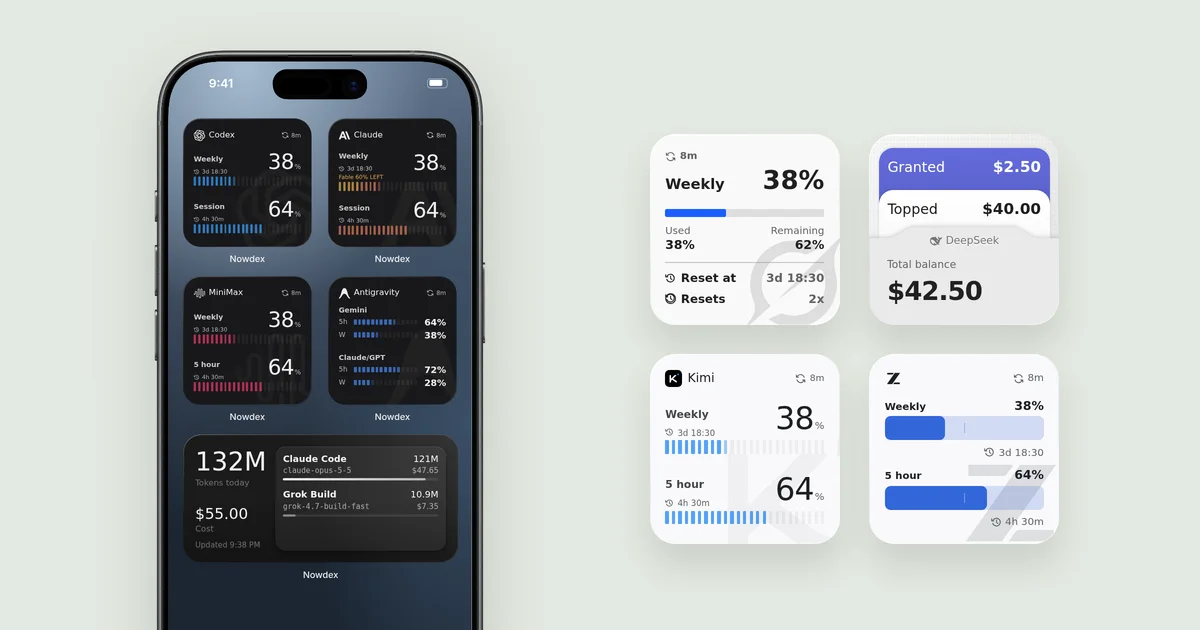
- Widgets built for each service. A Codex widget shows the weekly and session windows, the Claude widget also shows the Fable share of your week, Antigravity groups its Gemini and Claude/GPT pools, and DeepSeek and OpenRouter show balances instead of percentages. There are multi-account and Lock Screen widgets too. You can try every one of them on the home page.
- Token usage as well as limits. Connect the tokens.ci usage tracker, and the Usage tab and the Today’s Usage widget show today’s tokens and cost by agent and model.
- A usage forecast that estimates whether a window will run out before it resets, based on how fast you are using it, and an optional reminder when a weekly limit resets.
- The same accounts everywhere. A free Mac app puts your limits in the menu bar, and iCloud Sync (Pro) copies your setup to your iPad and Mac. There are also free apps for Windows and Android.
- No Nowdex account. Sign-ins stay in your Keychain, and your device asks each provider for usage directly.
Price: free for one account on one service. Nowdex Pro is a one-time US$5.99 purchase that unlocks every service and more accounts. It is not a subscription.
Downsides: it doesn’t keep a history of your limits over time, and there are no alerts before a limit runs out. If you only use Claude and ChatGPT and want both, look at the next app.

2. Usage for Claude + ChatGPT: best for Claude and ChatGPT only
This app focuses on two services and goes deep on them: session and weekly limits, per-model limits, alerts before a limit runs out and when it resets, a service status indicator, and session history of up to 90 days. It runs on iPhone, iPad, and Mac, and has an Apple Watch app for Claude limits.
Choose it if Claude and ChatGPT (Codex) are all you use and you want history and notifications. Skip it if you also pay for Cursor, Grok, or anything else, because it doesn’t track them. Pro is a subscription, or a one-time purchase.
3. Limits: simple and iPhone-only
Limits is a clean iPhone app for Codex, Claude Code, Cursor, Grok, Antigravity, and Grok Bot, with ring and bar gauges, live reset countdowns, and Home Screen and Lock Screen widgets. It has the most ratings in this group (4.3 stars from 47 ratings), and reviewers praise the design and how quickly the developer responds.
Choose it if your services are on its list and you only need your phone. Skip it if you also want limits on your Mac or iPad: it’s iPhone-only.
4. AI Cockpit: best free option
AI Cockpit is free, with nothing locked behind a purchase. It also does more than most: a forecast under every window, alerts when a window fills or resets off schedule, a Live Activity with up to four bars, a Control Center control, and an Apple Watch app. It is also the only app here that tracks OpenAI and Anthropic API spend.
Choose it if you want the most features without paying. Skip it if you use Cursor, Antigravity, GLM, or MiniMax, which it doesn’t support, or if you want history: by its own description, it only shows where you stand now.
5. Nomo: for driving agents from your phone
Nomo shows usage limits and service status for Claude, OpenAI, Cursor, xAI, Antigravity, Kimi, and DeepSeek, with free Home Screen widgets. Its main feature is Nomo Pro, though: live Claude Code, Codex, OpenCode, Cursor, and Antigravity sessions in the Dynamic Island, where you can approve, answer, and interrupt your agents.
Choose it if you want to manage running agents from your iPhone. Skip it if you only need limits: Lock Screen widgets require the subscription, and agent sessions need a plugin on your computer.
6. TokenBar Mobile: for API-key services
TokenBar Mobile covers 13 services and leans toward API-key ones: Claude, GitHub Copilot, Cursor, OpenAI (Admin API), OpenRouter, DeepSeek, Moonshot, Z.ai, Kimi, MiniMax, ElevenLabs, Synthetic, and Warp. Pro adds reset alerts, a Live Activity, widgets, an Apple Watch app, and 90-day history.
Choose it if you already use TokenBar on the Mac. Skip it if you need Codex, which its listing doesn’t include, or widgets without a subscription.
7. CodexBar Usage Monitor: for GitHub and Gemini
This paid iOS app (US$3.99) shares its name with the CodexBar Mac menu bar app but comes from a different developer. It covers ChatGPT/Codex, Claude, Grok, Cursor, OpenRouter, OpenCode, Kimi, and Google Gemini, and adds GitHub Copilot, GitHub Billing, and Greptile, which few others track. You can customize its cards, and it keeps up to 90 days of history.
Choose it if you need GitHub billing or Gemini. Skip it if you want to try before you pay, or want a Mac menu bar that shows the same accounts.
If you are looking for the original Mac app, see CodexBar vs. ccusage vs. Nowdex, and for Windows, CodexBar for Windows.
Which one should you pick?
- You use three or more services, or anything beyond Claude and Codex: Nowdex.
- You only use Claude and ChatGPT and want alerts and history: Usage for Claude + ChatGPT.
- You don’t want to pay anything: AI Cockpit, or the free tier of Nowdex for one account.
- You want to approve and answer agents from your phone: Nomo.
- You also want the numbers on a Mac, Windows PC, or Android phone: Nowdex is the only app on this list with apps for all three.
FAQ
Is there an official Claude or ChatGPT widget that shows usage limits?
No. Claude shows your limits in Settings → Usage, and Codex shows them with /status and on the usage page at chatgpt.com, but neither has a Home Screen widget for remaining usage. That’s what these apps add. See how to check Claude usage and the Codex usage check for the official ways.
Are these apps safe to sign in to?
All of the apps above say they store credentials in the Keychain and have no account of their own. Nowdex sends each sign-in only to the service it belongs to, without a server in between. Whatever app you choose, read its privacy section on the App Store before you connect an account.
Do I need a Mac running for these apps to work?
Not for any of them. Each one fetches usage on the iPhone itself. A Mac is only needed for extras, such as Nomo’s agent sessions. A menu bar tracker or an iPhone app compares the two.
Can I see Cursor and Grok Bot usage on iPhone?
Yes, with Nowdex or Limits, among others. Nowdex shows Grok Bot as its own window next to your other Cursor usage, each with its own reset time. See how to check your Cursor usage and Grok Bot usage.