How to see your remaining Codex, Claude, and Cursor usage on iPhone
Put remaining AI usage and reset times on your iPhone Home Screen and Lock Screen — no Mac running, no website to open.
Coding agents are no longer something you only use at your desk. You start a Codex task from your phone, review a Claude session on the train, or check whether Cursor still has room before a meeting ends. The one thing that has stayed stuck on the laptop is the answer to a simple question: how much usage do I have left, and when does it reset?
This guide shows how to keep that answer on your iPhone.
What you want to see at a glance
Every provider measures limits a little differently, so “remaining usage” is really a few numbers:
- The main window — usually a weekly quota, sometimes a monthly one.
- The short window — a 5-hour or session limit that refills during the day.
- The reset time for each window, so you know whether to wait or switch agents.
- Anything provider-specific: Codex reset credits, the Fable share of your Claude week, Cursor’s Auto and API usage, Qoder’s plan and add-on credits, or a DeepSeek wallet balance.
Opening each provider’s website to find these is slow, and most of those pages are not built for a phone.
Set it up in three steps
- Install Nowdex from the App Store. It is a native iPhone and iPad app; it does not need a Mac companion running.
- Connect the accounts you already use. Nowdex supports Codex, Claude, Cursor, Grok, Antigravity, Kimi, GLM, MiniMax, Qoder, DeepSeek, OpenCode Go, Muse Code, and Command Code. There is no Nowdex account to create.
- Open Status. Every connected account shows its limit windows, what is left in each, and when each one resets.
The free version connects one account for one service. Nowdex Pro unlocks more services and accounts.
Put it on the Home Screen
The Status screen is the full view, but the fastest way to check is not to open anything. Add a Nowdex widget to the Home Screen:
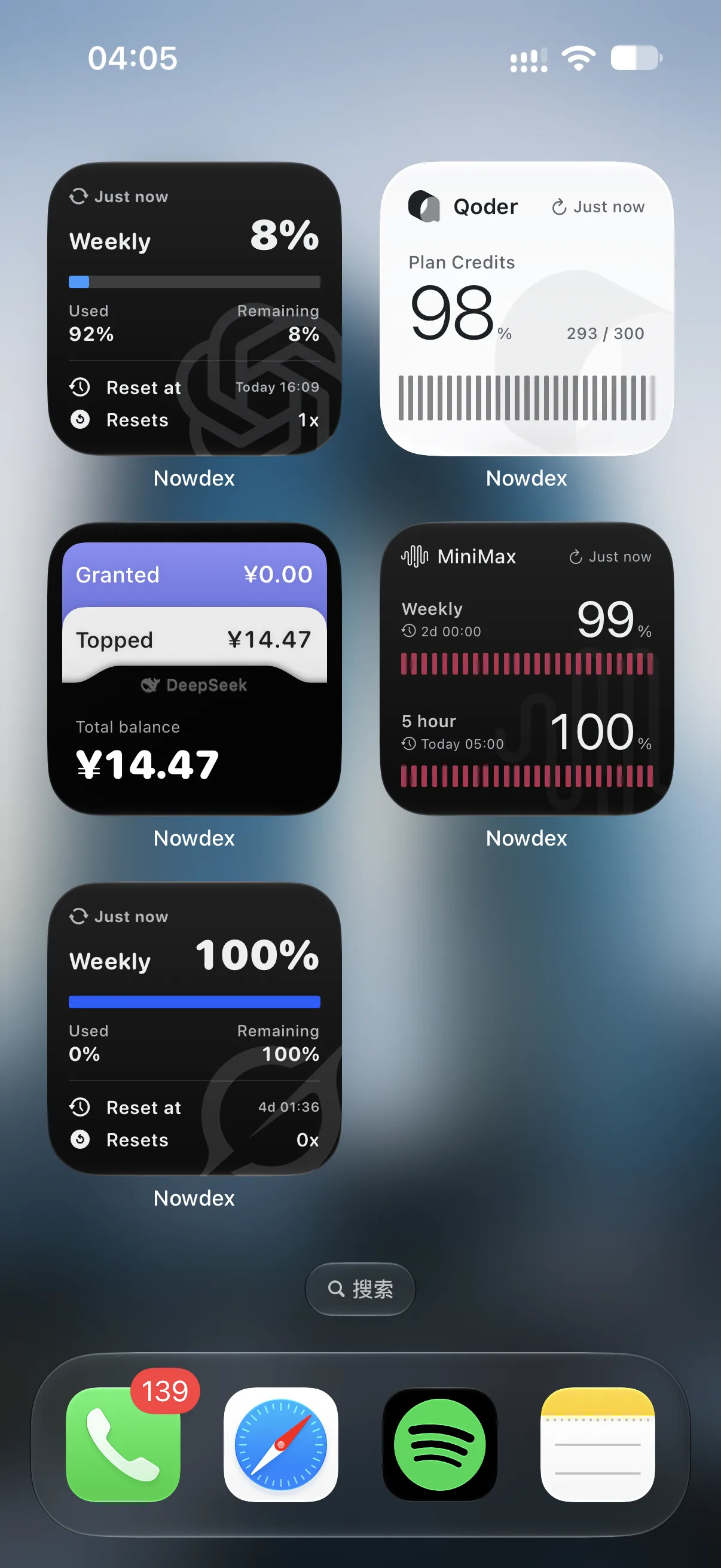
- Single-provider widgets are drawn for that provider’s own limits. Codex can show its weekly window with or without the session window; Claude adds the Fable share of your week; DeepSeek shows granted, topped-up, and total balance.
- Multi-provider widgets put several accounts side by side, so you can see which agent has room before you pick one.
- Lock Screen widgets give you the number between notifications, without unlocking.
You can try every provider’s widget in light and dark mode on the home page.
Where your credentials go
Sign-in credentials stay in the iPhone’s Keychain. Your device requests usage directly from each provider; Nowdex keeps no passwords or usage on its own servers. If you turn on iCloud Sync (part of Nowdex Pro), provider setup follows you to your iPad and Mac, and credentials sync through iCloud Keychain.
Common questions
Do I need a Mac running? No. Status and the widgets work on the phone by themselves. The Mac menu bar is an optional extra — see menu-bar trackers vs. an iPhone app.
How fresh are the numbers? Widgets show when they last updated. Open the app to refresh everything at once.
Can I see token usage and cost, not just limits? Yes. Connect the tokens.ci usage tracker once, and the Usage tab and the Today’s Usage widget show today’s tokens and cost and which agents and models they went to.