CodexBar vs. ccusage vs. Nowdex: which usage tracker?
CodexBar, ccusage, and Nowdex all track AI coding usage, but they answer different questions. Here is what each one shows, where it runs, and when to pick it.
If you use Claude Code, Codex, or Cursor every day, you have probably come across CodexBar and ccusage. Both are good, free, open-source tools. Nowdex overlaps with them, but the three answer slightly different questions:
- How much of my plan is left, and when does it reset? That is subscription quota.
- How many tokens did I use, and what would they cost? That is token usage.
- Where can I see it? Terminal, Mac menu bar, or the phone in your pocket.
At a glance
| ccusage | CodexBar | Nowdex | |
|---|---|---|---|
| What it is | Command-line tool | Mac menu bar app (plus a CLI) | App for iPhone, iPad, Mac, Apple Watch, and Windows |
| Remaining plan limits and reset times | No | Yes | Yes |
| Token usage and estimated cost | Yes, from local logs | Optional cost scan for Codex and Claude | Yes, by agent and model, powered by tokens.ci |
| Services | Claude Code, Codex, OpenCode, Gemini CLI, and many more agent CLIs | About 100 providers | 13 services, including Codex, Claude, Cursor, Grok, and Antigravity |
| Where you see it | Terminal | Mac menu bar and desktop widgets, Linux CLI | iPhone and iPad Home Screen and Lock Screen, Mac menu bar and desktop, Windows notification area |
| Price | Free, open source | Free, open source | Free for one account on Apple devices, Pro unlocks more; free on Windows |
ccusage: token reports in the terminal
ccusage reads the local logs that coding agents write and turns them into daily, weekly, monthly, and per-session reports of tokens and estimated cost. Its blocks report groups Claude Code usage into 5-hour windows, and it can print JSON for your own scripts.
It is the right tool if you want detailed numbers on your own machine and live in the terminal. What it does not do is ask Anthropic or OpenAI how much of your plan is left: it can estimate what you spent, but not your remaining quota or the official reset time.
CodexBar: the Mac menu bar, for almost every provider
CodexBar is a macOS menu bar app that shows session, weekly, and monthly limits with reset countdowns, credit balances, and provider status, for a very long list of providers. It also has desktop widgets, an optional local cost scan, and a CLI for macOS and Linux.
If you work at a Mac all day and use a provider that few tools support, CodexBar is hard to beat. It does not have an iPhone app, so your limits stay on the Mac.
Nowdex: limits and token usage, on every screen you use
Nowdex shows your remaining limits and reset times for 13 services, and it is built around the devices you have with you when you are away from the desk:
- iPhone and iPad Home Screen and Lock Screen widgets, so you can check your limits before you sit down to start a task.
- Mac menu bar and desktop widgets, synced with your iPhone and iPad over iCloud.
- Windows notification area app, for Windows PCs.
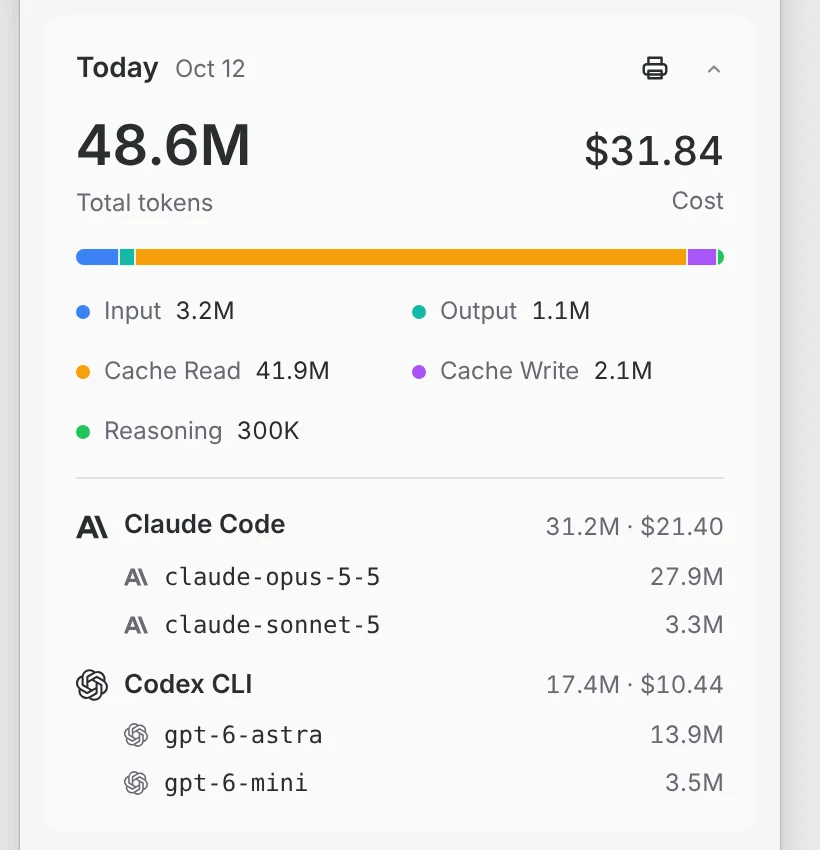
- Token usage, too: the Usage tab and the menu bar show today’s tokens and cost, split by input, output, cache, and reasoning, and by agent and model. That data comes from tokens.ci, so you get both answers in one app: what is left of your plan, and what you have used.
If Claude is the plan you watch most, the Claude usage tracker page shows what Nowdex tracks for it.
Sign-ins stay in your Keychain, and usage is requested directly from each provider by your device. There is no Nowdex account.
Which one should you use?
- You want token and cost reports in the terminal: ccusage.
- You are on a Mac all day and want the widest provider list: CodexBar.
- You want your limits on your iPhone, Lock Screen, or Windows PC, plus token usage in the same place: Nowdex.
They also work together: ccusage for detailed reports at the desk, Nowdex on your phone for the quick “can I start this task?” check. For a closer look at the Mac-versus-phone question, see menu-bar trackers vs. an iPhone app.
FAQ
Does ccusage show my remaining Claude or Codex limit?
No. ccusage reads local logs and reports tokens and estimated cost. It does not ask the provider for your plan’s remaining usage or reset time.
Is there a CodexBar for iPhone?
CodexBar runs on macOS, with a CLI for macOS and Linux. To see your AI usage limits on an iPhone or iPad, use an app with iOS widgets such as Nowdex.
Can Nowdex show token usage like ccusage?
Yes. Alongside your plan limits, Nowdex shows token usage and cost by agent and model, powered by tokens.ci. It is a summary rather than a terminal report, so ccusage is still the better fit if you want raw per-session data.