How to check your AI coding limits from your phone
A quick routine for checking Codex, Claude, Cursor, and other agent limits before you start a task — and knowing when they reset.

Running out of quota halfway through an agent task is the worst time to find out. The fix is a habit: check what is left before you start, the same way you would glance at a battery. This post covers how to make that check take a couple of seconds on your phone.
Why it is harder than it should be
Each provider reports limits in its own place and its own shape:
| Provider | What it limits | What you care about |
|---|---|---|
| Codex | Weekly quota and a session window | What is left, reset times, reset credits |
| Claude | Weekly and session limits | Both resets, plus the Fable share of your week |
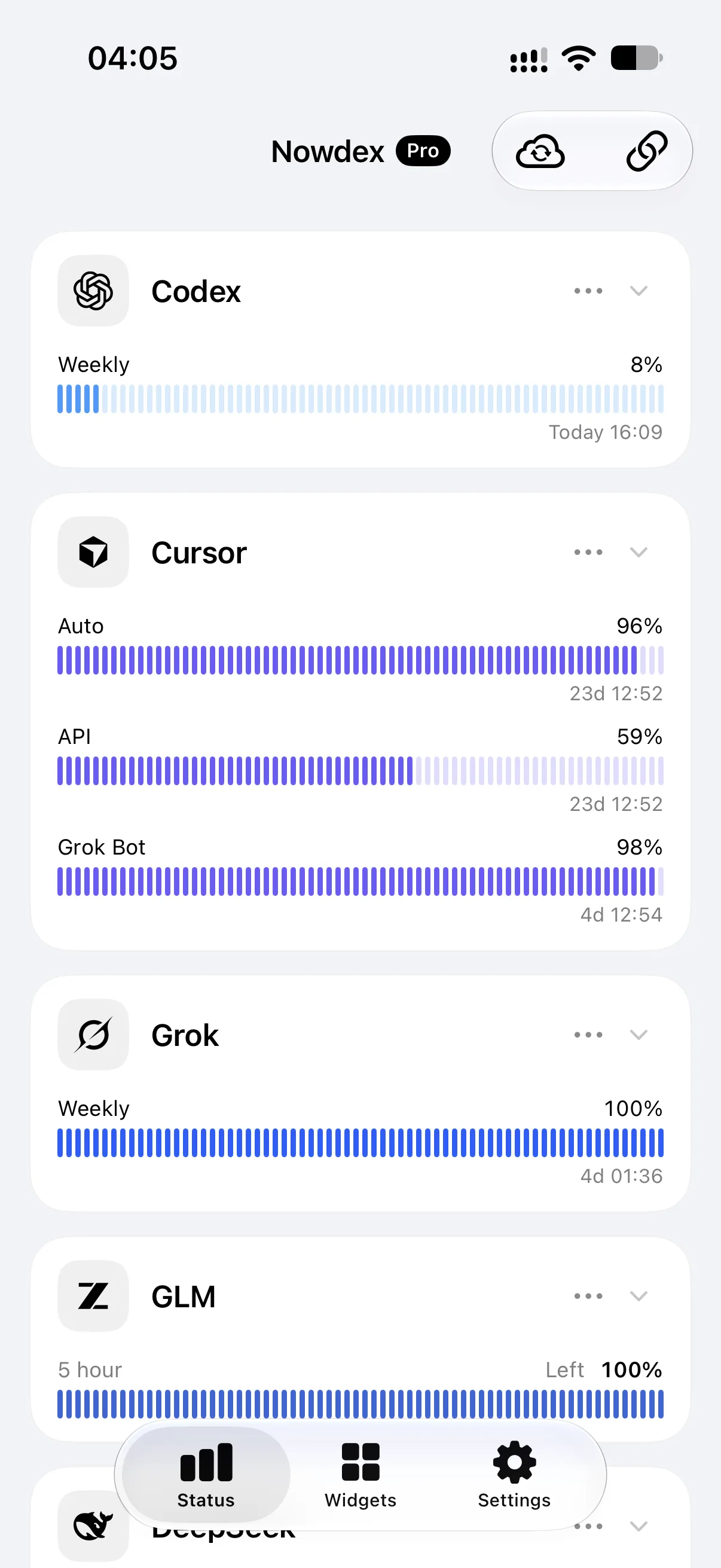
| Cursor | Auto, API, and Grok Bot usage | Which pool is running low |
| Kimi, GLM, MiniMax | A main quota and a 5-hour window | Two separate reset times |
| Qoder | Plan and add-on credits | Which credits you are spending |
| DeepSeek | A prepaid wallet | Granted, topped-up, and total balance |
Checking three of these means three websites, three sign-ins, and three different layouts — none of which are designed for a quick look on a phone.
A two-second routine
- Glance at a widget. With a Nowdex widget on your Home Screen or Lock Screen, remaining usage and the next reset are already there.
- If it is tight, open Status. It lists every connected account with all of its windows and reset times, so you can see whether the short window refills soon or whether the weekly quota is the real problem.
- Pick the agent with room. If Claude’s week is nearly spent but Codex has plenty, start the task there instead.
Setting this up takes a few minutes: install Nowdex, connect the accounts you already have, and add a widget. Details are in how to see remaining usage on iPhone.
Reading the numbers
- Used vs. left. Home Screen widgets show the share you have used; the Mac menu bar shows what is left. Check the label before you read the number.
- Reset time. A countdown such as
4h 30mis for a short window; a day and time such as3d 18:30is usually the weekly reset. - Reset credits. Some Codex plans report reset credits. They are counted separately from the reset time — one tells you when, the other how many.
- Colors. Bars keep the provider’s color until a window is nearly spent, then turn orange and red.
At the desk, too
On a Mac, Nowdex lives in the menu bar. You choose up to two numbers from one account to stay visible up there; everything else is one click away. With iCloud Sync (Nowdex Pro), you only set up providers once for iPhone, iPad, and Mac.
Beyond limits: what did today cost?
Limits tell you what is left. If you also want to know what you used, connect the tokens.ci usage tracker. Nowdex then shows today’s tokens and cost, which agents and models they went to, and a year of activity — on the Usage tab, in the Mac menu bar, and in the Today’s Usage widget.